
Features


Playbooks
See lead details, notes, pipeline stage, and activity timeline in WhatsApp Web—without switching windows.
See the Extension in Action2,500+
Leads managed daily
6.2s
Response time improvement
92%
Pipeline visibility
Zero
Window switches
The real problem
WhatsApp Reps Are Blind to Your CRM
Your sales reps live in WhatsApp, but your CRM is in a different window. They chat without context, repeat questions, and make offers based on assumptions.
Switching Between Apps
Reps switch to CRM to check pipeline stage while leads wait for responses. Context switching kills conversion.
Lost Context
Rep doesn't remember previous objections or whether they're a qualified prospect. Pitches fall flat.
No Lead Data While Chatting
Rep can't see lead source, activity history, notes, pipeline stage, or deal value all in one place.
Kraya solves this by putting your entire CRM right inside WhatsApp Web.
No switching. No lost context. No blind reps.
The extension
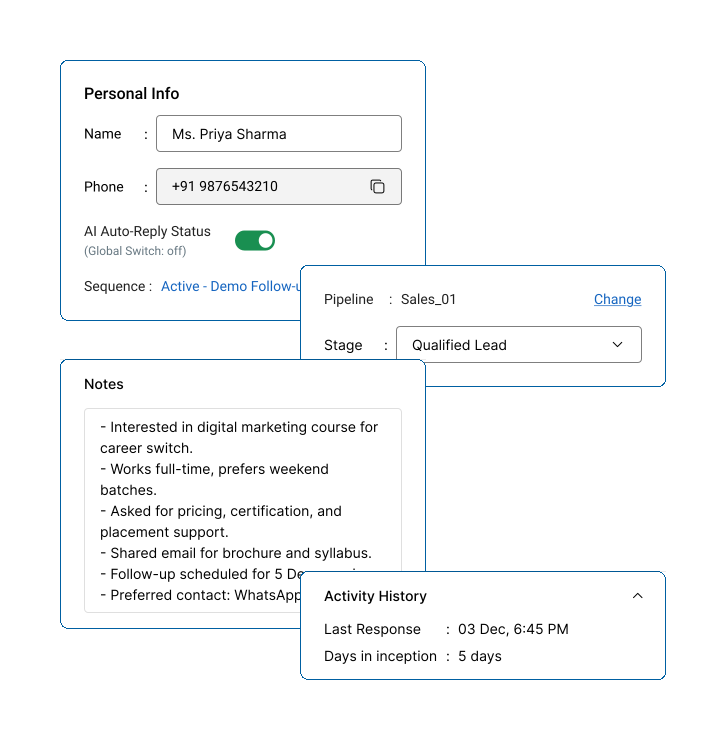
Five Tabs Inside Every Conversation
Lead Details
Name, email, phone, company, source, deal value, and custom fields.
Notes
All historical notes from your team in chronological order.
Pipeline Stage
See exact stage and move leads with one click.
Activity Timeline
Complete history: emails, sequences, stage changes, notes.
Quick Actions
Move stage, add notes, log calls—all from the sidebar.
Two tools
When to Use Each One
Extension
(In WhatsApp Web)
Use when: Chatting with a lead
See the lead's CRM record while typing. Respond faster with full context.
Dashboard
(Kraya App)
Use when: Managing the pipeline
See all leads, filter by stage/source, check team activity and run reports.
See Lead Data
While You Chat
Everything you need to know about a lead—in real time, in the same window.
Full Lead Context
Name, email, phone, company, source, deal value—no tab switching.
Pipeline Visibility
Know exactly where the lead is. Move them with one click.
Historical Notes
All team documentation in one place, chronologically.
Activity Timeline
Emails, sequences, stage changes—complete history.
In the extension
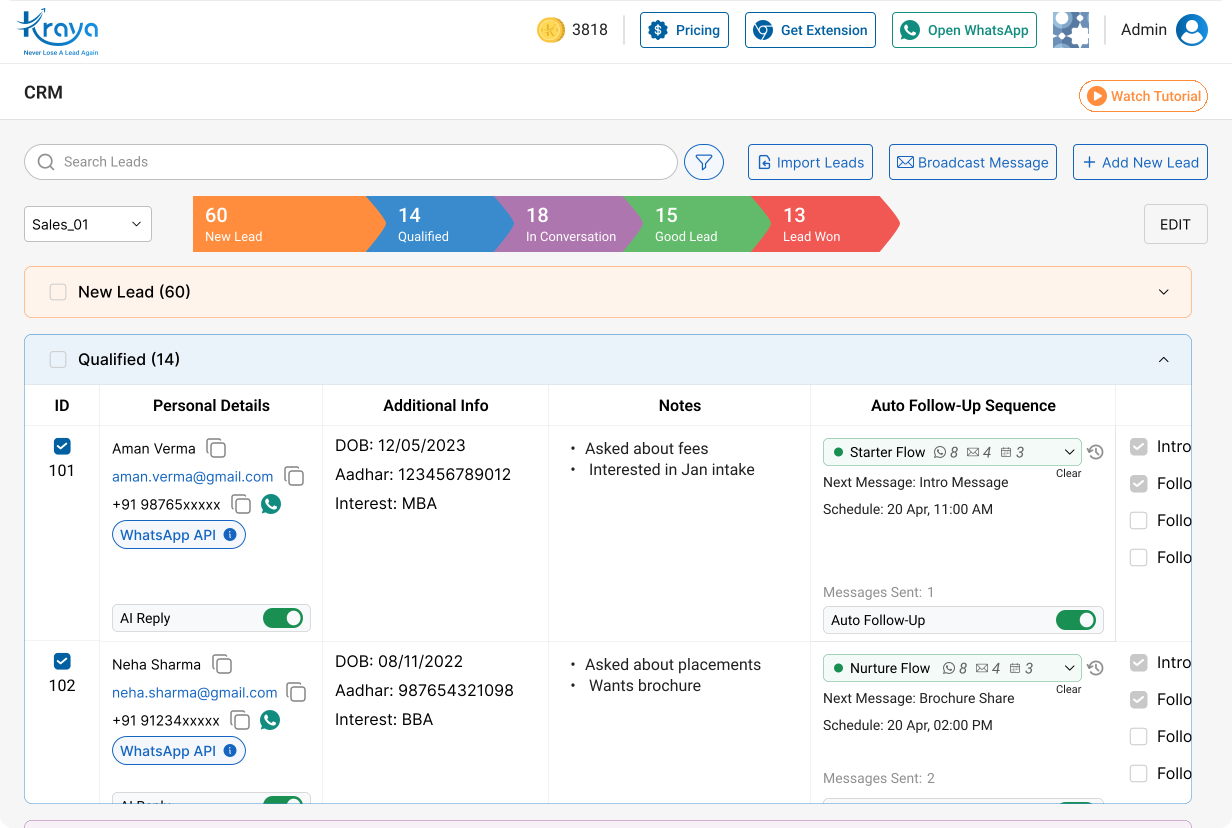
Filter Leads Your Way
By Pipeline Stage
Show only "Ready to Buy" or "Needs Follow-up" stages.
By Lead Source
Filter by website form, organic, referral, or other sources.
By Last Activity
Find leads who haven't responded in 24 hours or are recently active.
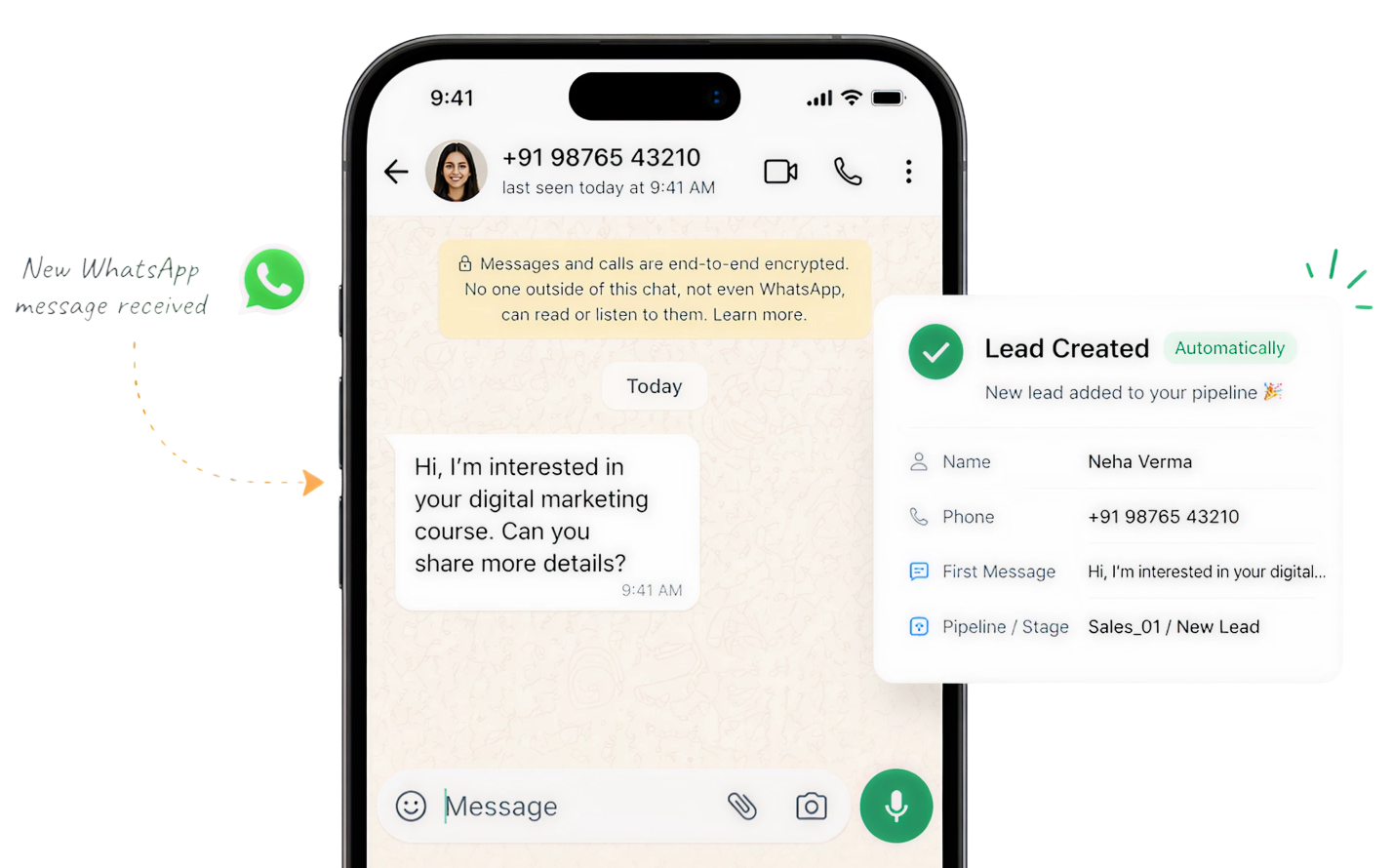
New WhatsApp Chats Auto-Create Leads
Every new message automatically becomes a lead record. No manual setup.
Send Sequences From WhatsApp
Start follow-up sequences directly from the sidebar while chatting—messages send through your rep's WhatsApp account.
The difference
Without vs. With WhatsApp CRM
What you get
Six Core Features
Chrome Extension
Sidebar on WhatsApp Web. Works on any computer.
Pipeline View
See all leads, filter by stage or source.
Lead Details
Complete contact info, company, deal value in one tab.
Smart Filters
Filter by stage, source, or last activity.
Auto Lead Creation
Every WhatsApp conversation becomes a lead automatically.
Dashboard Sync
Changes sync instantly between extension and dashboard.
Questions
Frequently Asked
More tools
See What Else Kraya Does
Combine WhatsApp CRM with other Kraya tools to build your complete sales system.
Stop Switching Between WhatsApp and Your CRM
Install the Kraya Chrome Extension and keep your entire CRM visible in every conversation.
See the Extension in Action


